
By Click&Clean - Saturday, 7 July 2018. - Last Update: November 14, 2018. Dear All: Today, we want to give you some helpful tips and information on how to increase your online privacy and security using Click&Clean commands from the context menu.
Check your search qualityShow results for Click&Clean …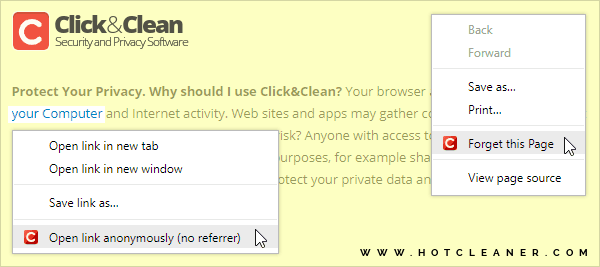
A context menu in Google Chrome for Desktop is the menu that appears when you right-click on anything in the Chrome browser. This is efficient, since this menu will only appear when you want to use it. Click&Clean Chrome Edition provides an extra security features through the context menu. To make these security features available, you will need to open Click&Clean settings and select the checkbox labeled "Add commands to context menu" in the "EXTRA" section.
One of these extra security features will allow you to clear your browsing data from the website you are currently visiting quickly and easily. You'll need to right-click anywhere on the current page and select "Forget this Page" from the Click&Clean context menu. All your digital tracks from this website will be deleted instantly.
When you click on any link to navigate to another website, the new website you visit receives the exact address of the website you came from. To avoid this and anonymously open any links without sending a referrer, you'll need to right-click on the link and select "Open link anonymously (no referrer)" from the context menu. This simple step will also help you increase your level of privacy and security when you surf the Internet.